Pomodozer Plus Help
Help Manual for Pomodozer Plus App
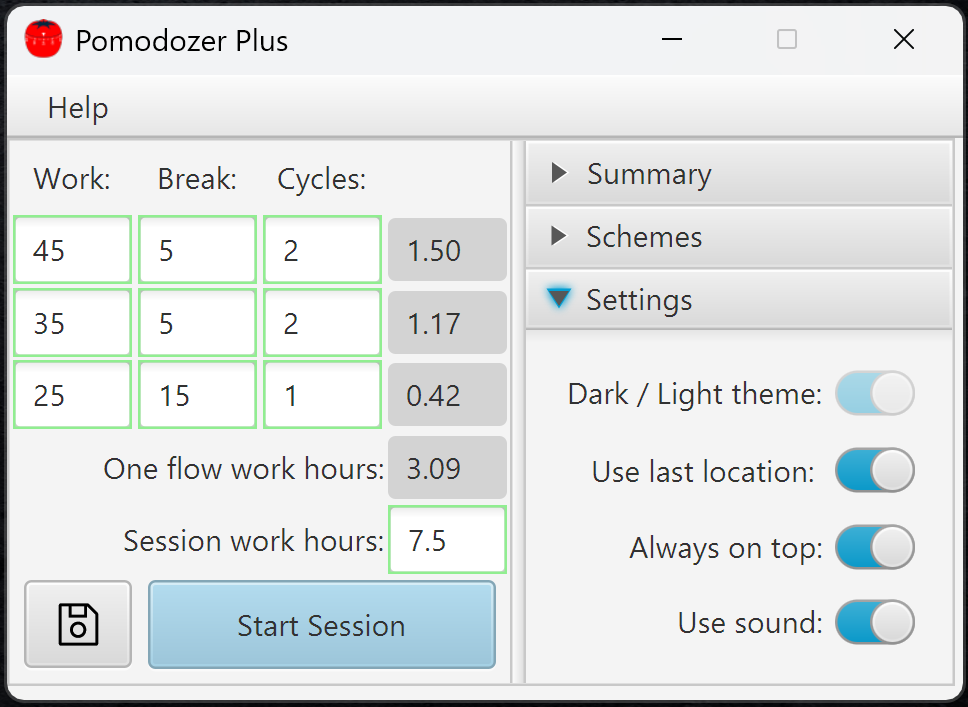
The Pomodozer Plus app supports the following settings:
- Dark/Light theme: Currently, the app supports only the Light Theme. The Dark Theme will be introduced in future updates.
- Use last Location: When enabled, the app remembers its last screen position. The next time it starts, it will appear exactly where it was last closed, even across multiple monitors.
- Always on top: Keeps the app always visible above other windows. Very useful when working with multiple screens or switching between many apps.
- Use sound: Enables audio feedback during app operation. Helpful for staying aware of focus/break changes without needing to watch the screen.
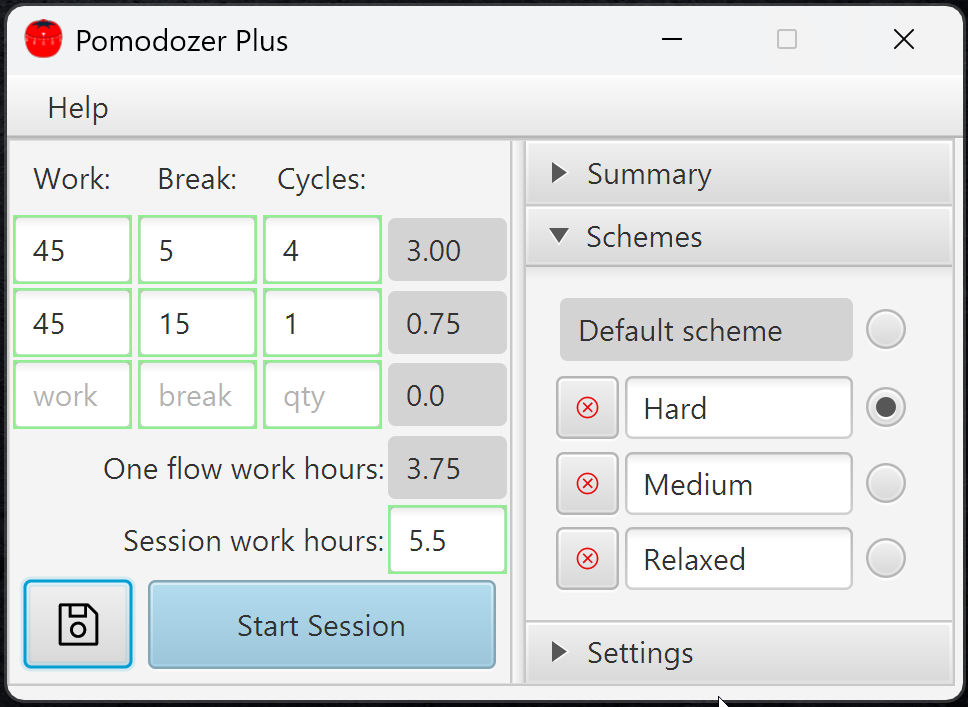
Pomodozer Plus — Schemes & Session Setup Help:
Pomodozer Plus is an advanced version of Pomodozer Lite with powerful support for customizable and persistent Pomodoro schemes. It provides both a classic default scheme and the ability to create and save up to 3 custom presets that are retained between sessions.
Default Scheme (Loaded Automatically):
When the app starts, it automatically loads the classic Pomodoro flow, consisting of two parts:
- 25 / 5 / 4: 25 minutes of focused work, followed by 5-minute breaks, repeated 4 times.
- 25 / 20 / 1: 25 minutes of work, followed by a longer 20-minute break, used once.
This combination is ideal for maintaining focus and avoiding burnout.
💡 Note: This default scheme can be edited, but changes will not be saved after restarting the app.
Custom Schemes with Persistent Slots:
Pomodozer Plus provides 3 customizable slots where you can:
- 🔧 Create your own Pomodoro schemes.
- 💾 Save them for future sessions (even after closing the app).
- ❌ Delete them anytime.
- 🔘 Use the radio buttons to switch between the default scheme and saved presets.
Creating a Custom Scheme:
To define your own workflow, use the editable table on the left:
- Work: Duration of focused work (in whole minutes).
- Break: Duration of rest after each work block (in whole minutes).
- Cycles: Number of times to repeat each work/break pair (whole numbers only).
You can chain multiple rows for more complex flows (e.g., warm-up + deep work phases).
Once the desired structure is set:
- Click Save next to a slot to store your scheme.
- Switch between saved and default schemes using the radio buttons.
Session Length Options:
There are two ways to control how long your session will run:
✅ Open-ended session:
- Leave the “Session work hours” field empty.
- The session will continue cycling through your defined scheme until you manually stop it using the Stop session button.
✅ Fixed work duration:
- If you want to work for a specific total amount of time, enter a value in “Session work hours” (in hours, as a decimal – e.g. 2.5 for 2 hours 30 minutes).
- ⚠️ This value includes only focused work time — break times defined in the scheme are not counted toward the total.
Starting the Session:
Once your custom scheme is configured:
- Review your work/break cycles.
- Optionally set the total of Session work hours.
- Click Start session to begin.
The app will handle the cycle flow automatically based on your settings.
💡 Pro Tips:
- Mix short and long cycles in separate rows to design personalized focus strategies.
- Use Slot 1 for your main routine, Slot 2 for deep work, and Slot 3 for lighter or weekend flows.
- Schemes can be overwritten anytime — just make changes and press Save

Session Control Help:
Once you've defined your scheme, click the Start Session button to begin your Pomodoro session.
During the Session:
The main timer displays the current interval (Work or Break) and remaining time. You can control the session using the buttons below the timer:
- Stop: Ends the session completely.
- Skip: Skips the current break and moves directly to the next work interval.
- Pause: Temporarily halts the session — you can resume anytime.
- Start: Begins the session.
These controls let you stay flexible and adjust the session flow as needed.
Session Summary Panel:
On the right side, you'll find live session statistics:
- Total cycles: How many work cycles have been completed.
- Total hours: Total time spent.
- Work hours: Total time spent working.
- Break hours: Total time spent on breaks.
Clear Summary Statistics:
After the session starts and first tracking data appears, a flame icon will appear on the timer screen.
Click it to instantly reset all session statistics.
Finishing a Session:
When your session ends — either by completing all planned cycles or manually stopping — you’ll return to the final state.
To start a new session:
- Click the Back button to return to the Schemes Setup screen.
- From Schemes Setup screen, you can load a saved scheme or define a new one.
💡 Tip: Use this summary data to fine-tune your scheme for better focus and balance between work and rest.
Frequently Asked Questions
If you don't see an answer to your question, you can send us an email from our contact form.
The Pomodoro Technique is a time management method that breaks your work into focused intervals (called “pomodoros”), usually 25 minutes long, followed by a 5-minute break. After four pomodoros, you take a longer break of 15–30 minutes.
Pomodozer Lite lets you set up a customized work/break scheme, but it doesn’t save your changes — the next time you open the app, it will load the default scheme again.
Pomodozer Plus, in addition to the default scheme, offers 3 slots where you can save your own custom schemes and easily switch between them anytime. This gives you more flexibility to adapt the app to different tasks or workflows.
Both Pomodozer Lite and Pomodozer Plus let you set up sessions in two ways:
- Unlimited session — set in field Session work hours zero or empty value and the timer keeps running until you manually press the Stop session button.
- Fixed work hours — set in field Session work hours the required number of work hours and the session will continue until the set time is completed.
This gives you flexibility to work either open-ended or with a clear time goal, depending on your needs.
To get Pomodozer Lite, simply register on our website — you’ll then get access to a download link on product page Pomodozer Lite.
For Pomodozer Plus, you can either:
- Register on our website and purchase the app directly. After purchase, you’ll receive a download link and license instructions.
- Buy the app through our partners (links are available on the product page at Pomodozer Plus).
Pomodozer Lite and Pomodozer Plus currently support Windows 10 and Windows 11.
Linux support is coming soon and will be available in future updates.